FocusDrop for Mac 1.0 Coming soon

A Mac menu bar timer that lives in your notch.

No Dock icon, no window to manage. Built for ADHD by a developer who has it. Hover the notch and this focus timer opens with your next task, a dial and today's habits. What's in it is your actual deck — the same tasks, streak and session as your iPhone and Apple Watch.

Coming to the Mac App Store See it on iPhone and Watch

macOS 14 Sonoma or later · Intel and Apple silicon · eight languages · no account

Hover the notch, or press ⌃⌥F Tap the notch
25:00
Next in today's plan
Draft the
launch email
Work · Medium
DoneLater
25min
Open focus
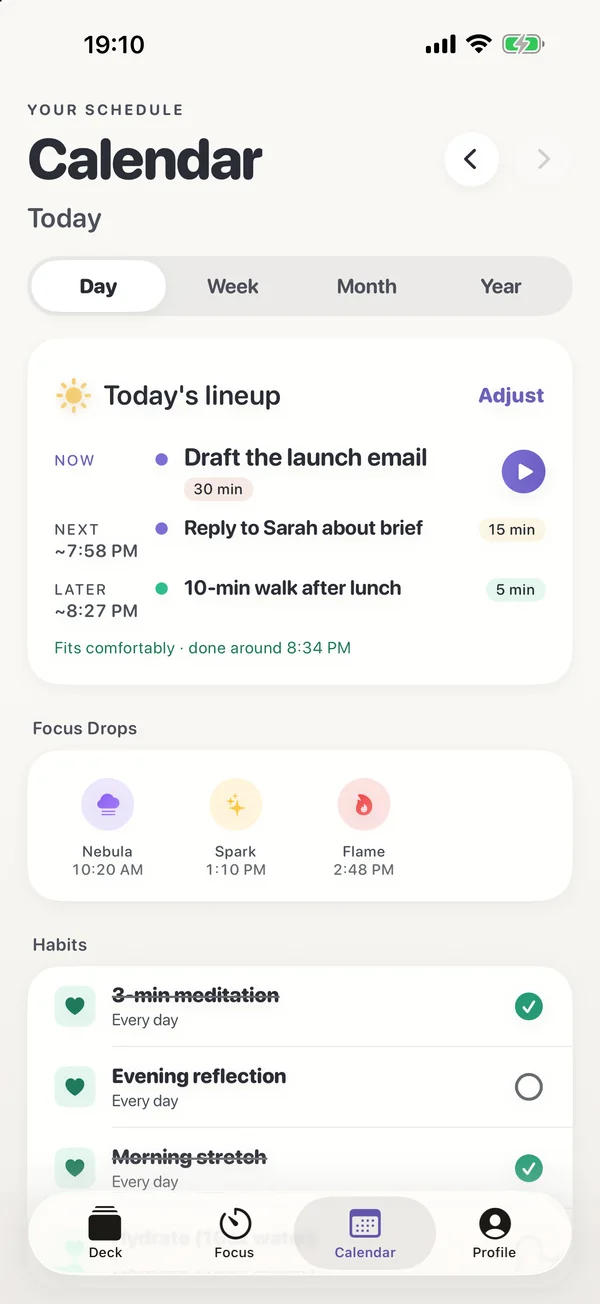
Today's lineup

Fits comfortably · done around 15:00

Adjust
NOW
Draft the launch email
25 min
NEXT~14:30
Reply to Sarah about brief
15 min
LATER~14:50
10-min walk after lunch
10 min
CALENDAR
Show today's calendar events
Read-only
Habits

2/4 rituals

Evening reflectionEvening
Hydrate (16oz water)Anytime
Morning stretchMorning
3-min meditationPre-Focus
Draft the launch email
Work · Medium
25:00Deep
That's done.

First one today. The hardest one's behind you.

Draft the launch email · +30 XP
Take a breath
FocusDrop for Mac: the island hanging from a MacBook's notch with Focus, Today, Deck and Habits tabs, the next task and a focus dial.

Notch & menu bar focus timer Four states, one place to look.

Hover the notch for a third of a second, or click it. Esc or a click anywhere else closes it. With an external display attached it stays on the built-in screen, where your eyes already are.

The FocusDrop island, ready: next in today's plan, Draft the launch email, with a ten-minute dial, Start Focus and Open focus.
Ready. Your next task, Done and Later, and a dial you drag — Sprint, Flow or Deep (10, 15 or 25 minutes) free, 5 to 60 with Pro. Or start an open focus with no timer.
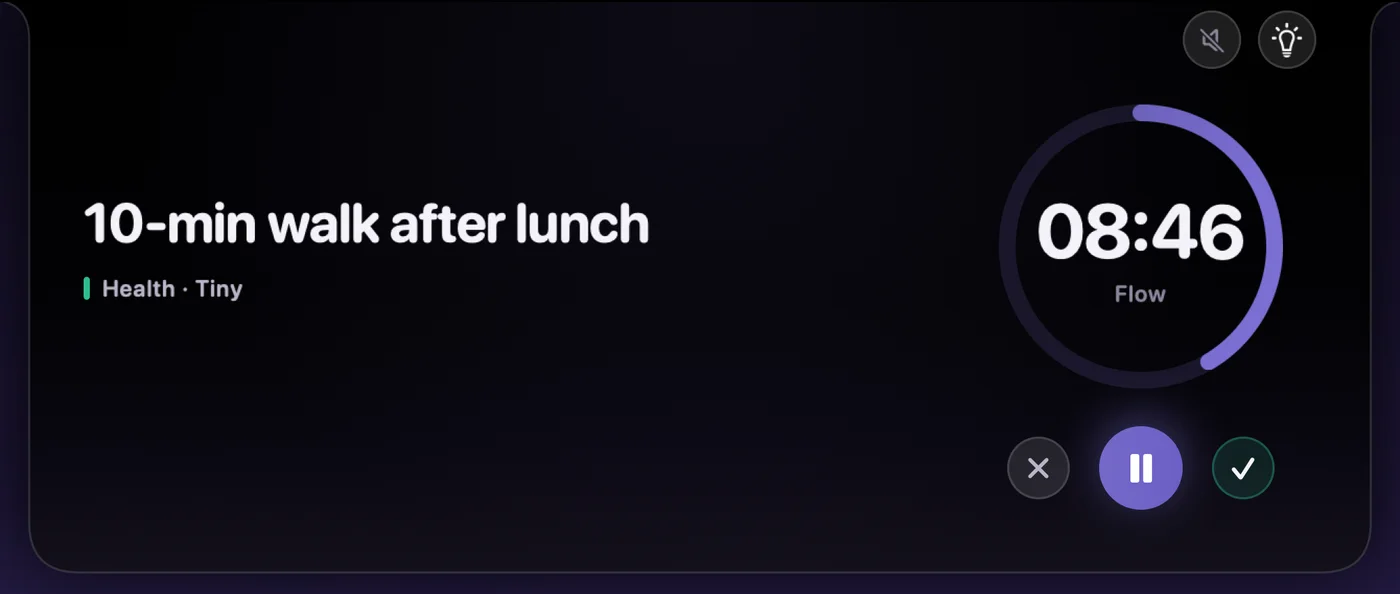
A focus session running in the island: 10-min walk after lunch in large type with Health · Tiny under it, 08:46 left in a Flow session, with cancel, pause and finish.
Running. The countdown sits beside the camera and in the menu bar, so you can see it without opening anything. Pro adds five more minutes mid-session.
Parking a thought mid-session: a field reading Check flight prices beneath the running task, with 06:18 left.
Park a thought. Something lands in your head at minute four? Type it, press Return, carry on. It waits for you at the end.
Session done in the island: That's done, first one today, the task struck through with +30 XP, Drop smiling, and Take a breath.
Done. The task off the board, the XP you earned, Drop pleased with you — and three slow breaths if you want them.

What is FocusDrop for Mac?

FocusDrop for Mac, coming soon and not yet on the Mac App Store, is a focus timer and one-task-at-a-time deck for ADHD that lives in the Mac menu bar. On a MacBook with a notch it opens as an island under the camera with your next task, a focus dial and today's habits, and it shares one deck with FocusDrop for iPhone and Apple Watch.

Needs
macOS 14 Sonoma or later, on an Intel or Apple silicon Mac
Lives in
The menu bar, with no Dock icon: an island under the notch, or a pill at the top centre on Macs without one
Price
The same free tier as iPhone (7 tasks, 5 sessions a day), and one Pro purchase covers both
Sync
With iPhone, and Apple Watch through it, via your own private iCloud. No account
Not on the Mac
Co-Focus, AI Task Breakdown, widgets, Live Activities and Pomodoro Mode stay on iPhone
Made by
Kiryl Zhukouski, a developer with ADHD

As of 23 October 2026, the App Store has FocusDrop 1.6.1 for iPhone and Apple Watch. FocusDrop 1.8 and FocusDrop for Mac 1.0 are built and coming soon; neither is on the App Store yet.

Keyboard shortcut ⌃⌥F from anywhere.

Mid-sentence in another app and something lands in your head? Press it, type the thought, and carry on. During a session the same keys park the thought instead, so you don't lose it and don't chase it.

It's registered with macOS as that one key combination and nothing else — FocusDrop cannot see anything else you type, and it needs no Accessibility or Input Monitoring permission. You can turn it off in Settings.

control⌃ option⌥ F

Try it on this page — it opens the island up top, or the park field during a session.

Tasks & Stats window A window, when you want more room.

The island is for the next ten seconds. The window is for the rest: today's lineup with soft times, the whole deck, your habits, and how the week is going — with Drop keeping you company.

The FocusDrop for Mac window on the Today tab: Today's lineup, fits comfortably; Draft the launch email now in a 330-point card, with a 25-minute Deep session and Start Focus.
Now, Next, Later. Plan today in a minute. The times re-flow as the day moves, and today's calendar events can sit in the plan as fixed points — read-only, today only.
The Stats tab in FocusDrop for Mac: Drop at level 5, 240 of 500 XP, and Your progress: the habit is forming.
Your progress, without the guilt. Level, XP and the week you've had. Whatever today looks like, Drop's there.

Sync with iPhone & Apple Watch One deck, three devices, no account.

Sign in to iCloud and that's the whole setup. Tasks, habits, focus sessions, XP, streaks and drops move between your Mac and your iPhone through your own private iCloud, which the developer can't read. Your tasks, habits, streak and the session in progress reach the Apple Watch through the iPhone.

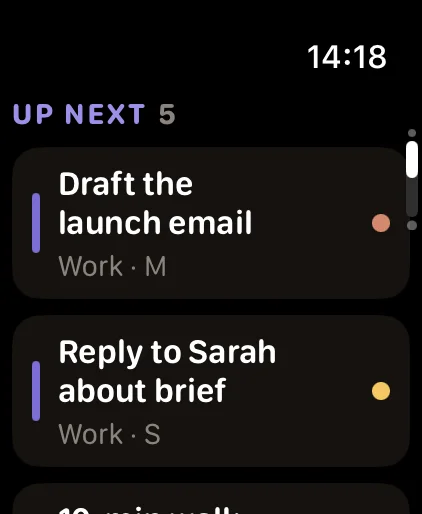
FocusDrop on Apple Watch

Your switch, your Mac

The Mac has a sync switch the iPhone doesn't: Settings → Sync → "Sync with iPhone & Apple Watch (iCloud)". Off means your data stays on this Mac.

What stays put

Today's plan, parked thoughts, your focus sound and your Mac settings stay on the device you made them on. The plan you made at your desk shouldn't rearrange itself because you picked up your phone.

One Pro, three devices

Pro is a single purchase on your Apple Account. Buy it on the iPhone and the Mac unlocks by itself; buy it here and the iPhone does.

What the Mac doesn't do. Co-Focus, AI Task Breakdown and anything else using Apple Intelligence are iPhone features. So are widgets, Live Activities, Siri and Shortcuts actions, Pomodoro Mode, Start smaller, the productivity heatmap, weekly challenges, the Reward Shop, themes, and the landscape clock faces coming in iPhone 1.8. Habits and gentle days are set on the iPhone; on the Mac you tick habits off, and a gentle day taken on the iPhone still holds your streak. Mac 1.0 is a focused first release, not a copy of the phone.

Pomodoro-style rounds & focus sounds on Mac Quiet by default.

Pomodoro-style rounds, breaks and six sounds

When a session ends, take a break or start another round; after your fourth session the break is a longer 15 minutes, and after two hours of focus in a row it suggests a rest. Pink, brown and white noise, rain, waves and a fan, generated in code, playing only while you focus.

Three notifications, if you want them

The session ending, the break ending, and a nudge to rest after two hours of focus in a row. Asked for at your first session, never at launch. If you keep notifications off, the end of a session plays macOS's own Glass sound instead.

It doesn't phone home

No Swift packages, no analytics, no crash reporter, no networking code of its own. The same "Data Not Collected" badge as the iPhone app. Privacy policy

FocusDrop for Mac FAQ Before you install it.

Is FocusDrop for Mac out yet?

Not yet: FocusDrop for Mac 1.0 is built, but as of 23 October 2026 it isn't on the Mac App Store, and there's no release date yet.

It will arrive in the same App Store listing as FocusDrop for iPhone and Apple Watch, which you can download today, and the same Pro purchase will cover it. Until then, the free focus timer runs in any browser on your Mac, without tasks, an account or sync.

Does FocusDrop for Mac work on a Mac without a notch?

Yes, FocusDrop for Mac works the same on a Mac without a notch: the island lives in a small pill at the top centre of the screen, and everything else is identical. If you connect an external display to a notched MacBook, FocusDrop stays on the built-in screen.

Where is FocusDrop for Mac after you install it?

FocusDrop for Mac lives in the menu bar as a small drop, and there's no Dock icon by design. The first time you open it, a window appears to show you where it lives.

If your menu bar is crowded, macOS can hide the drop behind the notch. The island and ⌃⌥F still work, and opening FocusDrop again from your Applications folder opens the island.

What does FocusDrop for Mac need?

FocusDrop for Mac needs macOS 14 Sonoma or later, on an Intel or Apple silicon Mac. It's a universal binary, not a Rosetta translation. Sync needs an iCloud account.

The iPhone and Apple Watch apps are optional: tasks, focus sessions, Today and your stats all work on the Mac alone. It's in the same eight languages as the iPhone app and follows your Mac's language.

Does FocusDrop's keyboard shortcut mean it can read what I type?

No: FocusDrop for Mac registers ⌃⌥F (Control-Option-F) with macOS as that one key combination, so it only ever hears that combination. It needs no Accessibility or Input Monitoring permission, which is the permission an app would need to read your keystrokes. While the island is open it also notices clicks outside it, only so it can close; nothing about them is kept. You can turn the shortcut off in Settings.

Does FocusDrop work as a Pomodoro timer for Mac?

Yes, FocusDrop for Mac works Pomodoro-style, without the iPhone's automatic Pomodoro Mode: when a session ends you take a break or start the next round yourself, and after your fourth session the break is a longer 15 minutes. The dial gives you Sprint, Flow or Deep — 10, 15 or 25 minutes — free, or 5 to 60 minutes in 5-minute steps with Pro, and an open focus with no countdown when you'd rather not pick a number.

On the iPhone, Pomodoro Mode runs four rounds and starts each one by itself when the break ends.

Does the Mac have a built-in Pomodoro timer?

No, macOS doesn't come with a Pomodoro timer, which is why FocusDrop for Mac has rounds and breaks of its own. Apple's Clock app, on the Mac since macOS Ventura, can run several named countdown timers with presets, but Apple's guide describes no Pomodoro, interval or break mode, so you'd restart each round and each break by hand.

Apple's own guide: set timers in Clock on Mac.

Is FocusDrop for Mac a separate purchase?

No: when it's released, FocusDrop for Mac will come in the same App Store listing, with the same Pro purchase, as the iPhone and Apple Watch apps. Free is the same on the Mac too: up to 7 tasks in your deck and 5 focus sessions a day, and with sync on your devices share one deck and one daily count.

Pro on the Mac removes both limits and adds focus lengths from 5 to 60 minutes on the dial, five more minutes during a timed session, and the weekly streak freeze.

Can I turn off FocusDrop's iCloud sync and keep everything on my Mac?

Yes: open FocusDrop's Settings from the drop in the menu bar, go to Sync, and switch off "Sync with iPhone & Apple Watch (iCloud)". The change takes effect when FocusDrop restarts. Any copy already in your iCloud stays there until you remove it; the privacy policy explains how.

Your next task,
one hover away.

FocusDrop for Mac is coming to the same free App Store listing as FocusDrop for iPhone and Apple Watch, which you can download today. No account, nothing to cancel.

Coming to the Mac App Store Download on the App StoreFor iPhone and Apple Watch, available today