

A free ADHD focus timer you set with one dial.

Drag the ring to a length you can face today and press Start Focus. If even that's too much, there's an open focus with no countdown at all. It runs right here in your browser with nothing to sign up for, and it was built by a developer with ADHD for the days when starting is the hard part.

  • Drag the ring for 5 to 60 minutes, or pick Pomodoro: four 25-minute rounds, 5-minute breaks, 15 after the fourth.
  • Finish early without failing: tap ✓ and keep the minutes you did.
  • Space starts and pauses, Esc stops. Sounds are generated, never looped.
25minDeep
4 rounds of 25 minutes · 5-minute breaks, 15 after the fourth
Nothing counts down. The clock counts up, so starting costs no decision.
Your one thing25:00Flow
Session complete
25min

Your one thing. That counts.

Breathe in

Sound
A browser tab is easy to lose. In the FocusDrop app, a timed session sits on your Lock Screen and in the Dynamic Island, and your Apple Watch shows it too. The Mac app, coming soon, will show a session you start on the Mac at the top of the screen, in the notch on MacBooks that have one.
Download on the App Store

Free online focus timer How to use this focus timer

Five steps, and only the third one is required.

  1. Type the one thing you're about to do, if you like. It stays in this tab and isn't saved.
  2. Pick a kind. Flow: drag the ring to any length from 5 to 60 minutes. Pomodoro: four 25-minute rounds with breaks between them. Open focus: no countdown at all.
  3. Start. Press Start Focus, or Enter in the box. Space starts, pauses and resumes; Esc stops.
  4. Switch tabs if you need to. The tab title shows the time left, and a chime marks every change. Tap +5 for five more minutes.
  5. Finish early without failing: tap ✓, and Finish · 12 min keeps the minutes you did.

Open focus is the Flowtime idea: the clock counts up and you stop when you're done.

Pomodoro, open focus or any length Pick the one you can face today.

Some days are a clean 25 minutes. Some days the only honest answer is "I'll start and see". An ADHD focus timer has to work on both, so the first three ways in work right here, and in the FocusDrop app all four start from the same screen.

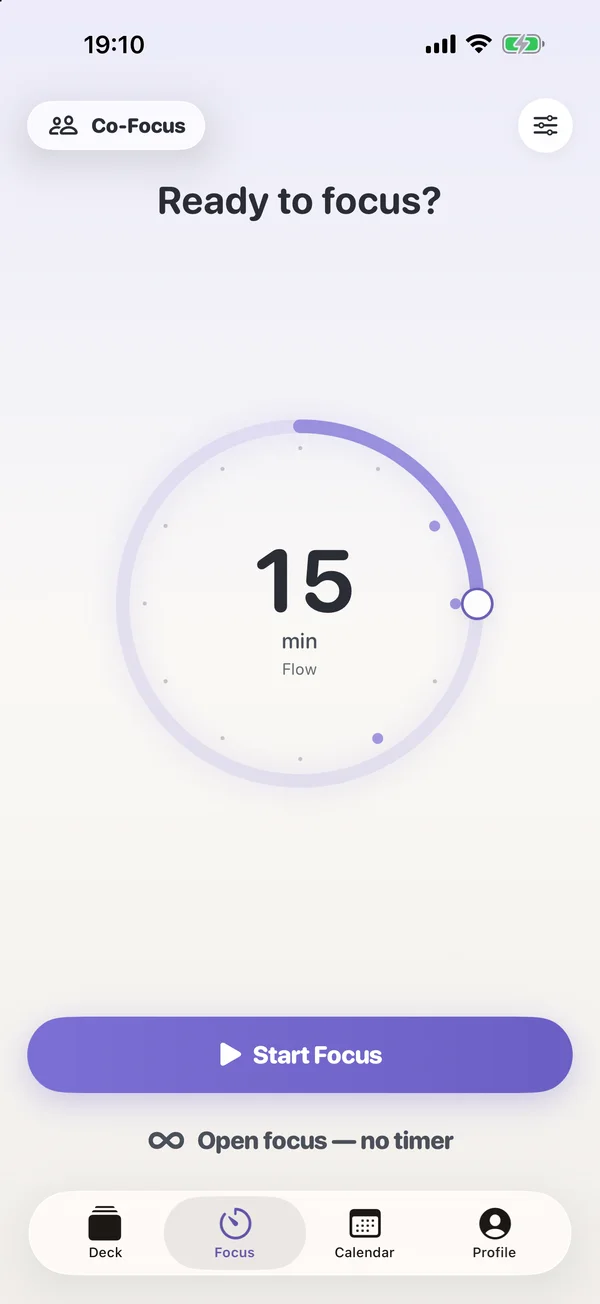
FocusDrop 1.8's Focus tab, ready to start: a dial set to 15 minutes, Flow, with Start Focus and Open focus — no timer.

Drag the ring

Ten minutes counts. A short session you start beats a long one you don't, so the ring here goes from 5 to 60 minutes. Past twelve o'clock it stops at 60 rather than wrapping round to 5, the kind of thing you only notice when it's wrong. In the app, 10, 15 and 25 minutes are free and any other length is Pro. FocusDrop 1.8, coming soon, sets them with this same ring.

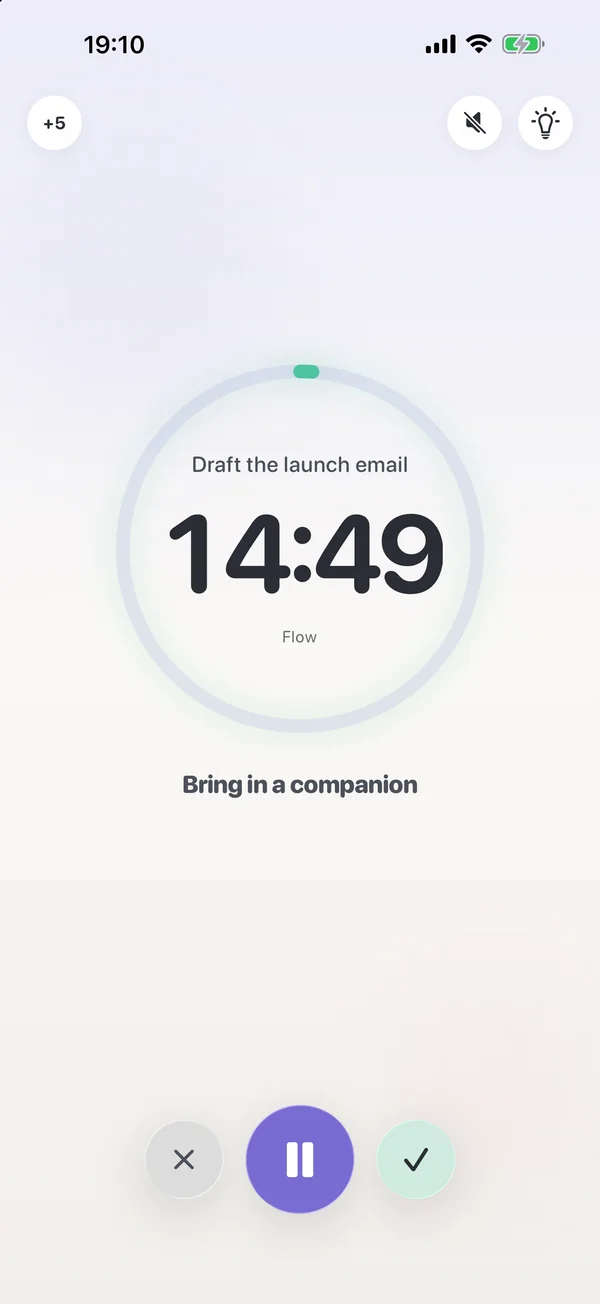
A Flow session running in FocusDrop: Draft the launch email, 14:49 left, with Bring in a companion below.

Open focus — no timer

Nothing counts down. The clock counts up instead, so starting costs you no decision about how long you'll last. In the FocusDrop app it still earns the session, the drop and the streak day, and it's free. It's the one for bad days.

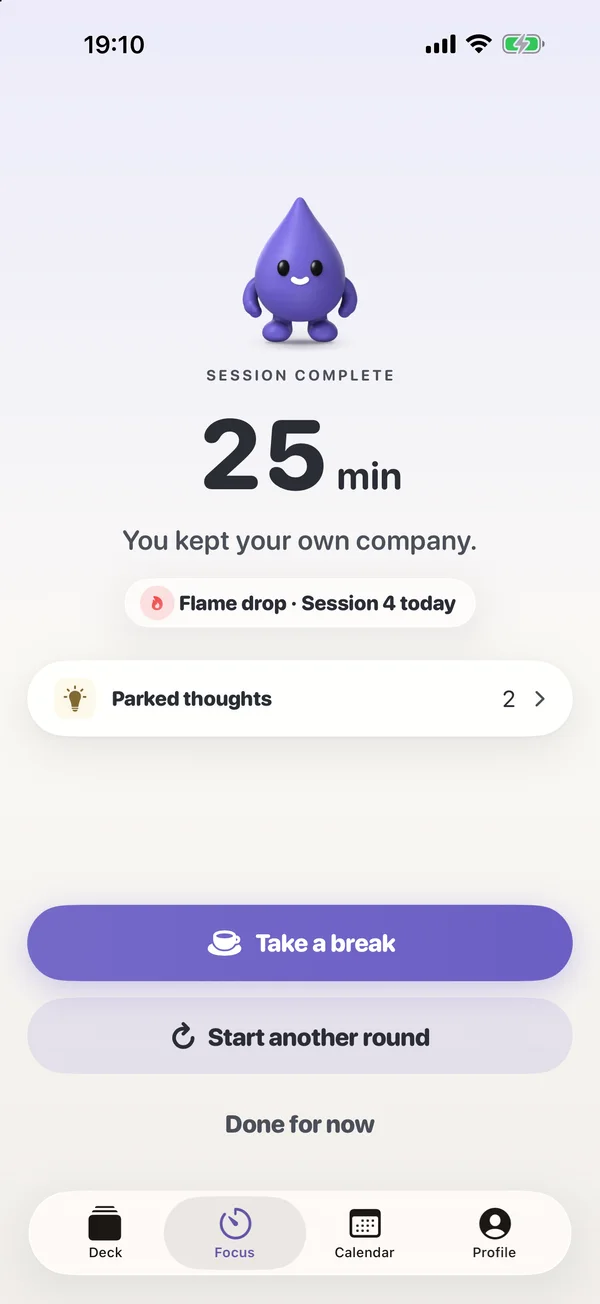
Session complete in FocusDrop 1.8: 25 minutes with Drop above, a flame drop for the fourth session today, and Take a break or Start another round.

Pomodoro rounds

Four rounds with breaks between them, cycled for you. Here that's 25 minutes a round, a 5-minute break after each of the first three and 15 minutes after the fourth. In the FocusDrop app the rounds use whichever length you pick, the short break follows it (3, 5 or 8 minutes after 10, 15 or 25), and you can add or take off thirty seconds while a break runs.

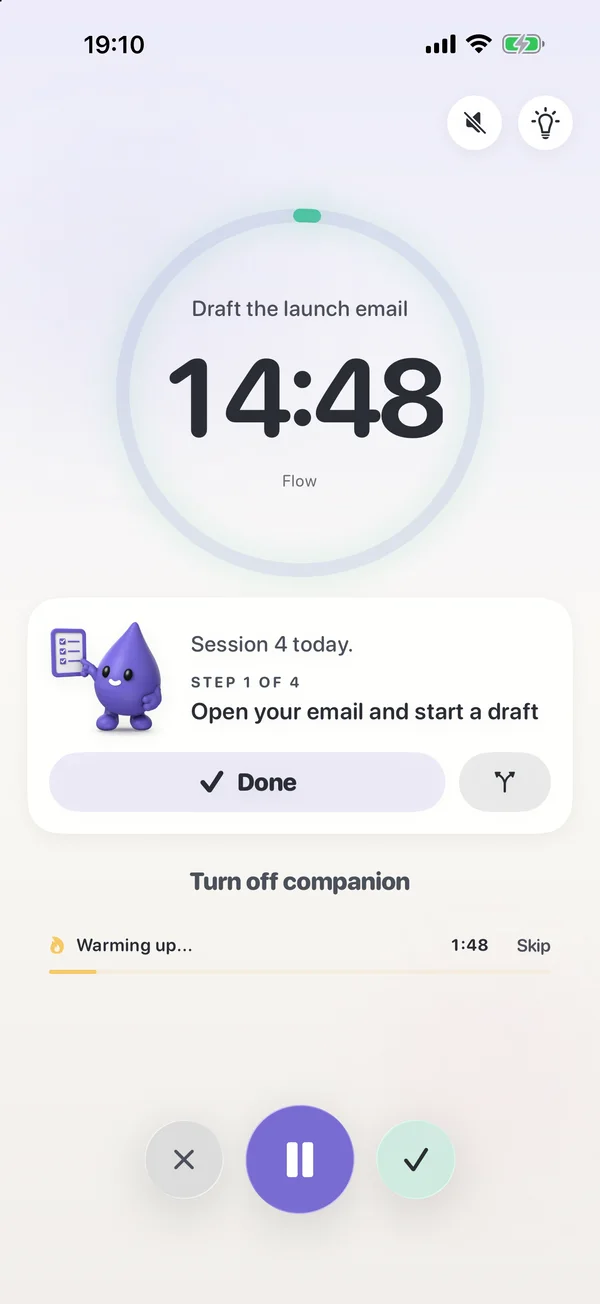
Co-Focus in FocusDrop 1.8: Drop beside you with his own checklist during a session.

With an AI body double Pro

Co-Focus keeps you company while you work: body doubling without a video call, and without another person. It's Pro and iPhone only. On iPhones with Apple Intelligence its coaching is written on the device, so nothing you type is sent to an AI service or to the developer. Coming in 1.8: Drop sits beside you with his own checklist and ticks it off as you finish each step. Why body doubling works

Lock Screen & Apple Watch countdown A timer you can't lose.

A browser-tab timer disappears the moment you switch tabs, which, if you're reading this, you probably do. In the FocusDrop app the countdown lives outside the app it was started in.

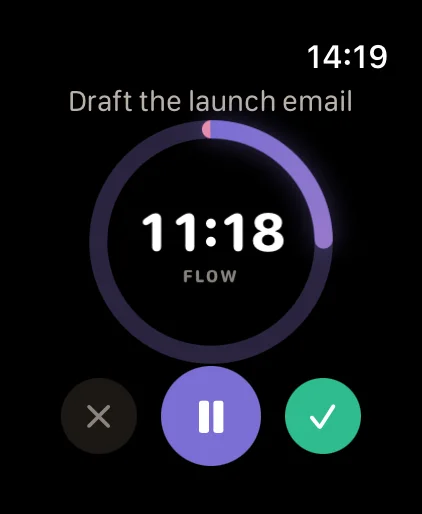
The FocusDrop countdown on Apple Watch: 11:18 left in a Flow session.
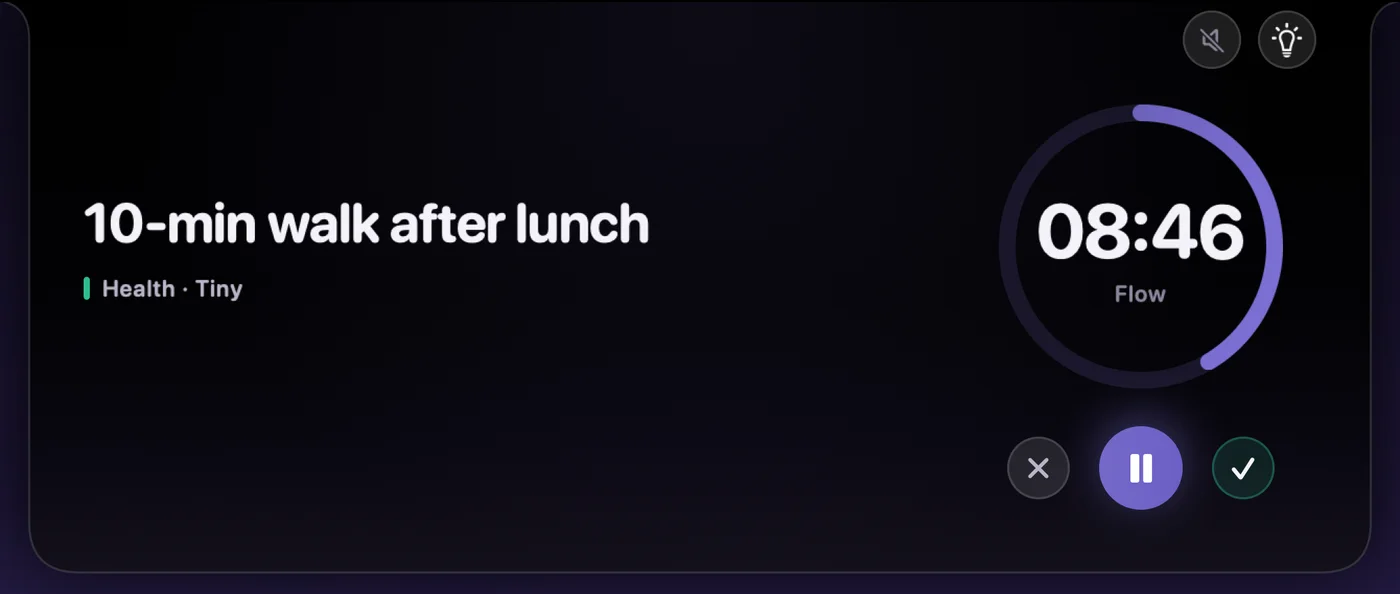
FocusDrop for Mac: the countdown in the notch island, 08:46 left beside the camera.
The countdown on iPhone: Draft the launch email, 14:49.

Lock Screen and Dynamic Island

For a timed session, a Live Activity carries the task and the time left, so a glance at a dark phone tells you where you are. Widgets put your next task one tap from Focus.

On your wrist

For a timed session, your Apple Watch shows the same countdown. You can start a Sprint, Flow or Deep from your wrist, pause it or end it, and the Watch app is free with your paired iPhone. Coming in 1.8: breaks on the wrist, and the three-breath ritual with a tap each half-breath. FocusDrop for Apple Watch

In the Mac menu bar Coming soon

FocusDrop for Mac will put a live countdown at the top of the screen (beside the camera, on a MacBook with a notch) and in the menu bar, in every app, without opening anything. FocusDrop for Mac

Coming in FocusDrop 1.8: turn your iPhone sideways and the Focus tab becomes a desk clock with six faces. Classic and Disc are free; Numerals, Flip, Big and Drop come with Pro. What's coming in 1.8

Finish a focus session early The hard part isn't the task. It's the gap after it.

When this timer stops, you get the minutes you did, a soft chime and three breaths if you want them. In the FocusDrop app, Session complete shows the drop you earned, and when you mark the task done, the app goes one step further: three guided breaths, then one suggestion for what's next.

You can finish early without it feeling like failure, here and in the app: tap the check, the button becomes "Finish · 12 min", and a second tap keeps exactly that. Twelve minutes you did beats twenty-five you abandoned.

Focus timer & Pomodoro FAQ How long, how often, and why.

What's a good focus length for ADHD?

FocusDrop's answer comes from lived experience with ADHD, not medical advice: the best focus length is the one you'll actually start. A twelve-minute session you start beats a perfect forty-five you never do. That's why the FocusDrop app's free lengths are 10, 15 and 25 minutes, this timer's ring goes down to 5, and open focus skips the number altogether.

Is the Pomodoro technique good for ADHD?

FocusDrop's take, from lived experience: Pomodoro helps a lot of people because it makes the work finite and puts the breaks on a schedule. It can also backfire when a fixed 25 minutes starts to feel like a test you're failing. That's why FocusDrop's Pomodoro timer for ADHD sits next to other lengths and an open focus with no countdown at all, here and in the app.

Flowtime vs Pomodoro: which should I use?

With FocusDrop's focus timer you don't have to decide up front, because Pomodoro and open focus are one tap apart. Pomodoro gives the work a fixed shape, four 25-minute rounds with breaks, which helps when you need an end in sight. Open focus is the Flowtime idea: the clock counts up and you stop when you're done, which helps when a countdown feels like pressure. Try each on a real task and keep the one you start more often.

How long should I focus before taking a break?

FocusDrop's focus timer uses the classic Pomodoro rhythm: 25 minutes of focus, a 5-minute break, and a longer 15-minute break after the fourth round. The FocusDrop app ties the break to the length you picked: 3 minutes after 10, 5 after 15, 8 after 25, and 15 minutes after your fourth session. If 25 minutes feels too long to start, a shorter round you begin beats a longer one you don't.

Can I use the FocusDrop focus timer as a Pomodoro timer?

Yes. Pick Pomodoro and the FocusDrop focus timer runs four 25-minute rounds, with a 5-minute break after each of the first three and a 15-minute break after the fourth, chiming at every change. In the FocusDrop app, Pomodoro is four rounds of whichever length you pick (10, 15 or 25 minutes free), with a short break between rounds and a 15-minute break after the fourth.

Is there a focus timer with no countdown?

Yes: FocusDrop's open focus. Nothing counts down; the clock counts up, so starting costs no decision about how long you'll last, and you stop when you're done. It's free on this page and in the FocusDrop app, where it still earns the session, the drop and the streak day.

What is a focus timer?

A focus timer, like the free FocusDrop focus timer on this page, is a countdown you start for one task, so the length of the work is decided before you begin and the clock does the remembering. This one is a single ring: drag it to the length you can face today, and start.

Does the FocusDrop focus timer keep running in another tab?

Yes. The FocusDrop focus timer keeps time from the clock rather than counting ticks, so switching tabs doesn't slow it down, and the tab title shows the time left. It remembers only your mode, length and sound, in your own browser; what you type isn't saved. A tab is still easy to lose, which is why the FocusDrop app puts timed sessions on your Lock Screen and your Apple Watch.

Is there a web version of the FocusDrop app?

No. There's no web version of the FocusDrop app. The free focus timer on this page runs in any browser, without tasks, an account or sync. The app itself, with the task deck and iCloud sync, is on the App Store.

A tab is easy to lose.
Your wrist isn't.

The FocusDrop app is free on iPhone and Apple Watch, with 5 focus sessions a day and 7 tasks in your deck. A Mac app is coming soon.