FocusDrop



It needs your iPhone
FocusDrop for Apple Watch is a companion app, not a standalone one. Sessions run on your paired iPhone, so without it, and FocusDrop on it, the Watch has nothing to start.
Unlock your phone to start a timer and there's a fair chance you come back forty minutes later having started nothing. FocusDrop for Apple Watch starts a 10, 15 or 25-minute focus from your wrist instead, while your iPhone stays face down and runs it.
watchOS 10 or later · works with a paired iPhone on iOS 18 or later · eight languages
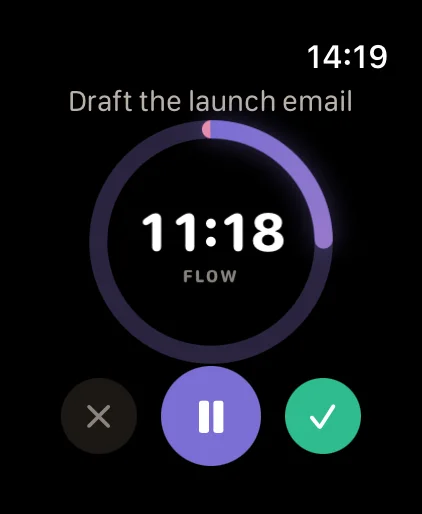
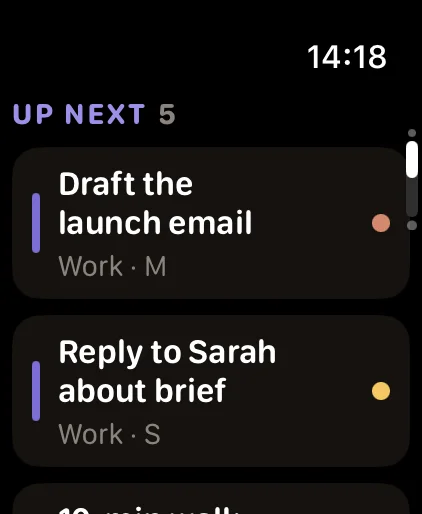
FocusDrop for Apple Watch is the Watch app inside FocusDrop: ADHD Focus Timer, a free iPhone app by Kiryl Zhukouski, a developer with ADHD. It starts, pauses and ends focus sessions that run on your iPhone, lists the next tasks in your deck, and lets you tick off today's habits.
As of 23 October 2026, the App Store has FocusDrop 1.6.1 for iPhone and Apple Watch. FocusDrop 1.8 and FocusDrop for Mac 1.0 are built and coming soon; neither is on the App Store yet.
Since {{RELEASE_DATE}}, the App Store has FocusDrop 1.8 for iPhone and Apple Watch, and FocusDrop for Mac 1.0.
Start Focus is the first page you see on the Watch. Three lengths, one tap each. The session starts on your iPhone, and the Watch counts it down on its own.
On the iPhone, FocusDrop shows one task at a time in a swipe deck, because thirty tasks on one screen is how nothing gets started. The Watch keeps it that small: Up next is the top of the same deck, up to eight tasks, and each one has three buttons.
Some days a timer isn't what gets you started; company is. That's body doubling, and why body doubling works for ADHD is a post of its own. FocusDrop's AI body double, Co-Focus (Pro), lives on the iPhone.
FocusDrop 1.8 is built and coming soon; it isn't on the App Store yet. These clips are recorded from the 1.8 build. Until it's out, the Watch works as described above.
The clips are recorded from the app.
Session complete keeps your minutes and its two buttons. In 1.8, Drop catches a trophy beside the number.
In 1.8, tap Complete on a task and the Watch says so, then offers three slow breaths before Up next and its Start Focus.
In 1.8, the breaths are four seconds in and six out, three times, with a tap on your wrist each half-breath, so you can do them with your eyes closed. I'm ready stops them early.
Also in 1.8. Breaks come to the Watch, with a countdown and an arrow button to end the break early; in 1.6.1 they run on the iPhone only; before 1.8 they ran on the iPhone only. Drop wears headphones on breaks and holds the trophy when the deck is clear, and 40 and 41 mm Watches get a tighter layout. Still not in 1.8: +5 minutes, a complication, or finishing early from the wrist.
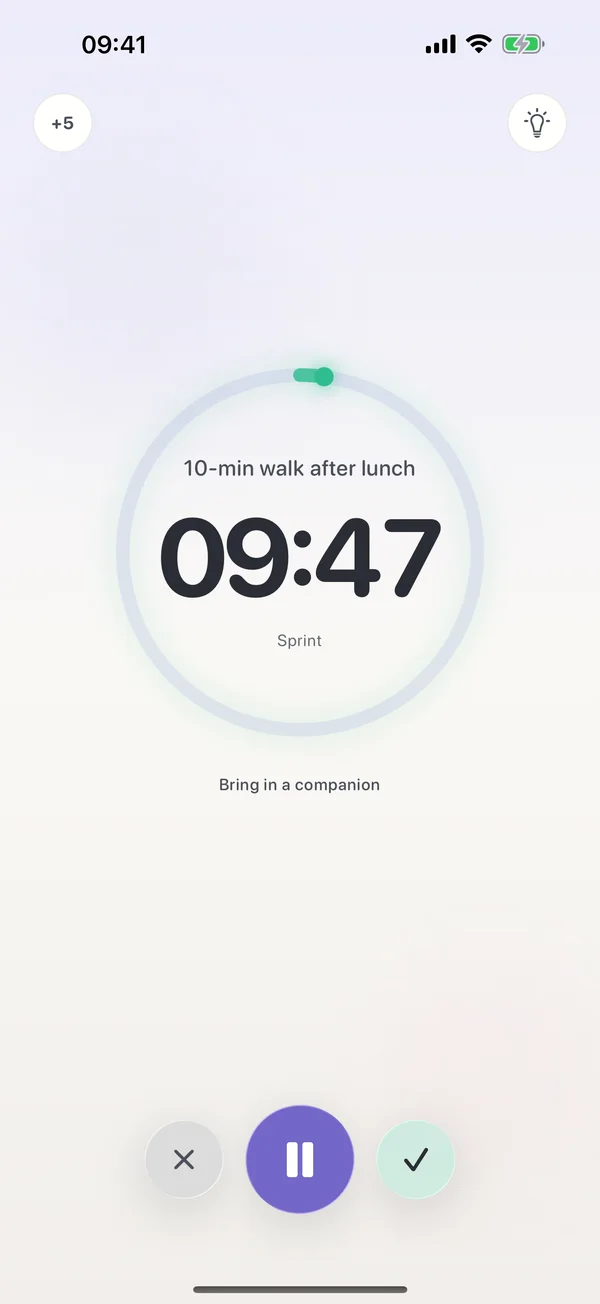
Every session lives on your iPhone. That's where it's saved and where its minutes count. The Watch sends your taps to the phone, and the phone sends back the time left, which the Watch counts down by itself.
The two talk directly, through Apple's WatchConnectivity, not through a FocusDrop server, and there's no account to sign in to. If they can't reach each other for a moment, what you tapped waits and goes through once they can. If the Watch stops updating, see what to do when the Watch isn't syncing.
Starts from your wrist use the same free allowance as the phone: 5 focus sessions a day. At the limit, the iPhone shows what Pro adds and the session doesn't start.
And the Mac, when it's released. FocusDrop for Mac is built and coming soon. It's designed so that a session you start in your Mac's notch shows on the Watch through your iPhone, as a read-only "Focusing on Mac" card. FocusDrop for Mac
And the Mac. A session you start in your Mac's notch shows on the Watch through your iPhone, as a read-only "Focusing on Mac" card. FocusDrop for Mac
Better to read it here than to find out on your wrist.
FocusDrop for Apple Watch is a companion app, not a standalone one. Sessions run on your paired iPhone, so without it, and FocusDrop on it, the Watch has nothing to start.
Adding five minutes mid-session is a Pro feature on the iPhone. The Watch can pause, resume and end a session, not stretch it.
Sprint, Flow and Deep only. Custom lengths (Pro) and open focus start on the iPhone. In 1.6.1, an open focus started there shows 0:00 on the Watch instead of counting up.
The × and the ✓ beside pause both end the session without recording it: no minutes, no XP. To stop early and keep the minutes, use Finish on the iPhone. A session that runs to the end is saved as usual.
There's no FocusDrop complication for your watch face. Co-Focus and AI Task Breakdown, both Pro, are iPhone features.
New tasks and habits are added on the iPhone. The Watch starts, completes and defers what's already in your deck, and ticks habits off.
Then FocusDrop isn't your app, and that's fine. These three run without an iPhone, which FocusDrop's Watch app can't.
| App | Runs without an iPhone | What it is | Price (US) |
|---|---|---|---|
| FocusDrop | No. It needs the paired iPhone | An ADHD task deck and focus timer. The Watch starts sessions, shows your next tasks and ticks habits | Free. The Watch needs no Pro; Pro on the iPhone is $3.99 a month, $23.99 a year or $49.99 once |
| FocusPomo · Pomodoro Timer | Yes, its listing says no iPhone is needed | A Pomodoro timer with tasks and statistics, also on iPad and Mac | Free download; FocusPomo Plus is $3.99 a month, with yearly and lifetime plans. Its listing doesn't say whether the Watch app needs Plus |
| Pommie - Pomodoro Timer | Yes, an independent Watch app with complications | Classic Pomodoro with your own work and break lengths. No developer update since December 2022 | $3.99 once |
| Timers, built into Apple Watch | Yes | Countdowns, several at once, each up to 24 hours. No Pomodoro rounds or breaks | Free, built in |
From each app's App Store listing and Apple's Timers guide, checked 23 October 2026.
Where FocusDrop is different: the Watch shows the same ADHD task deck and habits as your iPhone. There's no web version of the app, but the free focus timer runs in any browser, without tasks, an account or sync.
Apple Watch has no built-in Pomodoro timer; FocusDrop for Apple Watch starts 10, 15 or 25-minute focus sessions from your wrist and runs them on your iPhone. The Watch's Timers app runs countdowns, several at once and each up to 24 hours, but Apple's guide to the Timers app describes no Pomodoro rounds or breaks. FocusPomo and Pommie run Pomodoro timers on the Watch itself.
No. FocusDrop for Apple Watch is a companion app: it needs your paired iPhone with FocusDrop installed, because every session runs on the iPhone. If the two can't reach each other for a moment, what you tap waits and goes through once they can.
If you want a Watch timer that works with your iPhone left at home, FocusPomo and Pommie say on their App Store listings that their Watch apps run on their own.
Yes. FocusDrop's Start Focus page on the Watch offers Sprint (10 minutes), Flow (15) and Deep (25), and Start Focus on a task in Up next runs a 15-minute Flow on that task. The session runs on your iPhone, and you can pause, resume or end it from either. Sessions started from the wrist count toward the free 5 a day.
No. FocusDrop on Apple Watch has no +5 button. Adding five minutes mid-session is a Pro feature on the iPhone; on the Watch you can pause, resume or end the session.
Yes. FocusDrop for Apple Watch comes in the same free download as the iPhone app, and the Watch needs no Pro. Sessions you start from your wrist use the free allowance of 5 focus sessions a day.
At the limit the iPhone offers FocusDrop Pro: $3.99 a month, $23.99 a year with a 7-day free trial for new subscribers, or $49.99 once (US prices). There's no separate Watch purchase.
No. FocusDrop for Apple Watch has no watch-face complication. Open the app on your Watch to start or check a session.
FocusDrop for Apple Watch comes free with the iPhone app. No account, nothing to cancel.